Whenever a major tech event rolls around, I always look for that one device that makes me stop scrolling and say, “Wait, what?” This time around, as I was digging through the latest announcements, Lenovo managed to catch me completely off guard.
I spend a lot of time looking at screens, and if you are anything like me, you know that the workflow for 3D creators can be incredibly clunky. Between wearing uncomfortable VR headsets, juggling massive software interfaces on single monitors, and constantly fighting with the mouse to rotate a model just right, it’s exhausting. But Lenovo’s new Yoga Book Pro 3D Concept looks like it might actually solve some of these headaches.
Let me break down why this dual-screen, glasses-free 3D prototype has completely grabbed my attention, and why I think it could change how we interact with digital art.
Ditching the Glasses: The PureSight Pro Tandem OLED Magic


Let’s be honest for a second. Nobody actually likes wearing 3D glasses. They are annoying, they dim the screen, and if you already wear prescription glasses, they are a nightmare.
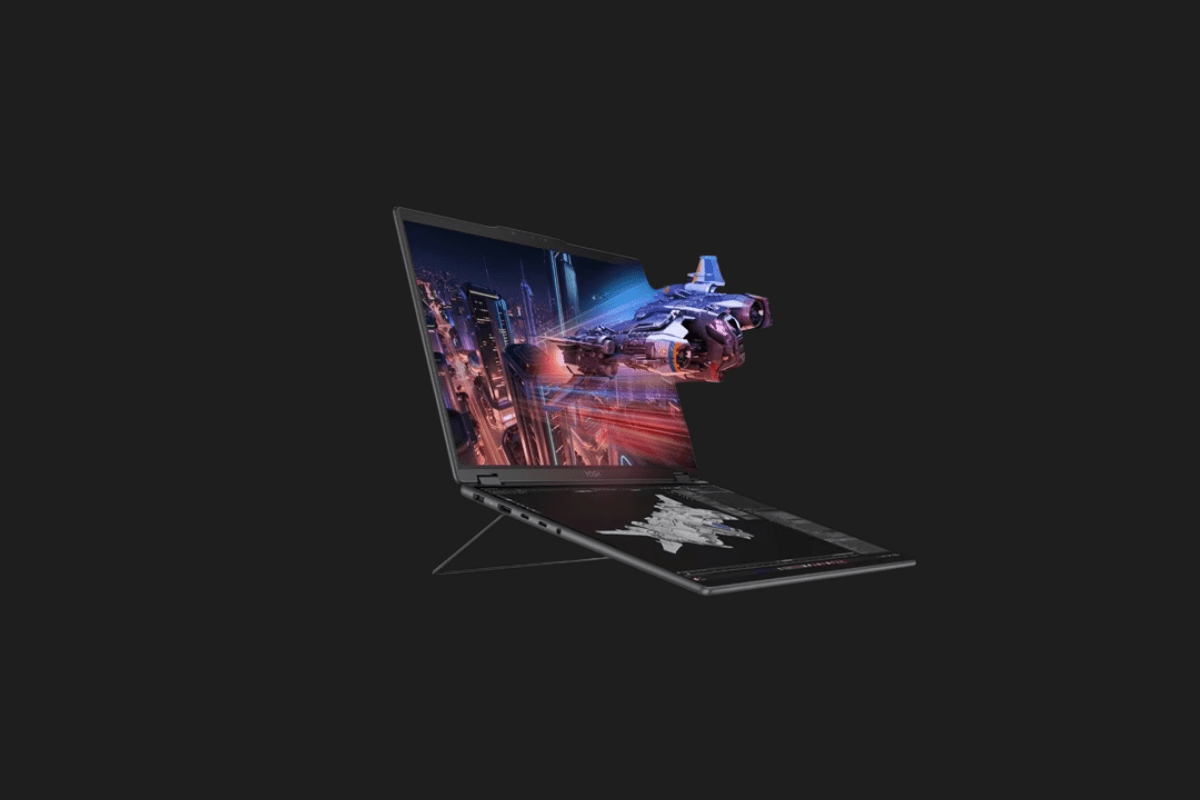
The heart of the Yoga Book Pro 3D Concept is Lenovo’s PureSight Pro Tandem OLED display architecture. Instead of relying on peripherals, the screen itself projects depth.
- How I see it working in real life: Imagine you are designing a character for a game. Normally, you rely on shadows and rotation to gauge depth. With this screen, you can see the structural layers of a 3D architectural model or the fine facial details of an avatar popping right out of the display.
- The Dual-Screen Advantage: If you use Blender or Maya, you know the interface is a mess of panels. The dual OLED setup allows you to throw your timeline, material nodes, and toolbars on the bottom flat screen, leaving the top 3D screen completely clean for your actual artwork.
When I first read about this, I was skeptical about viewing angles, but the idea of natively viewing a 3D model with bare eyes on a laptop is a game-changer for quick reviews and client presentations.
AI-Powered Creation: From 2D to 3D in Seconds
Hardware is only half the story. What really impressed me is how Lenovo is integrating AI directly into the creator workflow. The software system running on that top screen includes some serious AI-driven tools aimed at cutting down the tedious parts of 3D modeling.
Here are the standout software features:
- 2D-to-3D Conversion: You can import a flat, 2D image and the system will generate an editable 3D object from it. If you are doing rapid prototyping or need background props quickly, this skips hours of basic meshing.
- Prompt-Based Scene Generation: You can literally type in a command to generate an environmental background, and then drop your newly minted 3D objects right into it.
As someone who loves creating but sometimes gets bogged down by the technical setup, tools that speed up the pre-visualization phase are a massive win. Whether you are an indie game dev or an animator, being able to quickly block out a scene using text prompts gives you more time to focus on the actual storytelling.
Jedi-Level Gesture Controls: No Mouse Required?


This is where things get a bit “Tony Stark in his lab,” and I am entirely here for it.
The Yoga Book Pro 3D Concept features a built-in RGB camera designed specifically to track your hand movements. Instead of endlessly clicking and dragging to inspect your work, you can use physical gestures.
- Natural Interaction: You just wave your hand in front of the laptop to spin the model around.
- Pinch and Zoom: Grab the air to zoom in on a specific texture or change the object’s position within the generated scene.
I’ve always felt that working with 3D objects using a 2D mouse is fundamentally restrictive. While I don’t think I’d completely throw my mouse away for precise vertex editing, using my hands to quickly rotate, inspect, and present a model feels like the natural evolution of how we should interact with spatial computing.
My Final Thoughts: Will We Actually Get to Buy It?
Here is the catch: Lenovo hasn’t officially stated if or when the Yoga Book Pro 3D Concept will hit the shelves. It is, for now, just a concept.
But concepts are important. They show us where a company’s R&D money is going. By combining glasses-free 3D, dual OLEDs, built-in AI rendering, and gesture controls, Lenovo is sending a clear message: they are actively trying to rethink the traditional laptop for creative professionals.
I really hope this tech trickles down into consumer models soon. The barrier to entry for 3D creation has always been high, requiring beastly desktop rigs and steep learning curves. A portable, intuitive machine like this could open the floodgates for a new generation of creators.
I’m curious about your take on this workflow shift. Would you feel comfortable using hand gestures to design in a crowded coffee shop, or do you think you’d stick to a trusty mouse and keyboard? Let me know in the comments!
You Might Also Like;
- The New Era of Space Mechanics: Extending Satellite Lifespans
- AI Discovers Groundbreaking Non-Opioid Painkiller
- Mind Over Matter: What Neuralink’s First Human Trial Really Means for Our Future
-

-
-

-
-
-

-
-

-

-

-

-