
Artificial intelligence is changing the way we automate workflows, and Zapier AI is leading the charge by combining automation with smart AI capabilities. Unlike traditional automation tools, Zapier AI goes beyond simple triggers and actions—it can analyze data, suggest workflow optimizations, and generate content for seamless productivity.
What we loved most while testing Zapier AI is how intuitive and time-saving it feels. From marketing campaigns to operational processes, Zapier AI helps users automate repetitive tasks and streamline complex workflows effortlessly.
In this review, we’ll explore what Zapier AI is, its key features, benefits, limitations, pricing, and how to start using it effectively.
What is Zapier AI?

Zapier AI is an AI-powered automation platform that connects your favorite apps and services while adding intelligence to your workflows. It helps users automate repetitive tasks, generate content, analyze data, and receive AI-driven workflow suggestions.
It’s ideal for:
- Businesses automating daily tasks
- Marketing teams running campaigns
- E-commerce managers streamlining operations
- Freelancers and professionals saving time on repetitive work
Key Features of Zapier AI
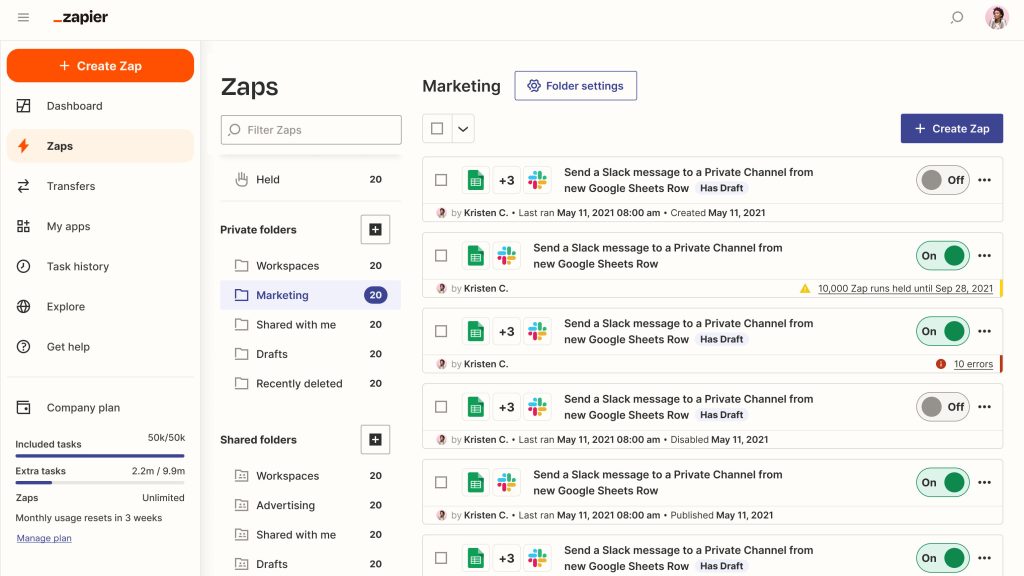
- Smart Workflow Automation: AI suggests optimizations and improvements for your Zaps.
- Content Generation: Draft emails, social posts, and messages with AI assistance.
- Data Analysis: Summarize and analyze data from connected apps.
- Multi-App Integration: Connects thousands of apps with intelligent automation.
- Custom AI Actions: Build workflows that include AI-driven decisions and content.
- Cloud-Based Platform: Access and manage workflows from anywhere.
Why We Enjoyed Zapier AI
The most impressive feature of Zapier AI is how it simplifies complex workflows and reduces manual effort. Its AI recommendations often uncover smarter ways to automate processes you might not have thought of.

Other advantages include:
- Time-Saving: Automates repetitive tasks across multiple apps.
- Enhanced Productivity: AI-driven suggestions improve workflow efficiency.
- Beginner-Friendly: Intuitive interface makes it accessible to anyone.
- Versatile Applications: From marketing to operations, it works across industries.
Areas for Improvement
- Pricing: Advanced AI features may require a paid plan.
- Complexity: Some AI workflows may need trial and error to perfect.
- Internet Required: Cloud-based, so a stable internet connection is necessary.
- Dependence on AI: Users may rely too heavily on AI for decision-making.
How to Use Zapier AI
Using Zapier AI is straightforward:
- Sign Up: Create an account on Zapier.com.
- Connect Apps: Link the apps you want to automate.
- Create a Zap: Set triggers, actions, and AI suggestions.
- Apply AI Enhancements: Let AI generate content, summarize data, or optimize workflow.
- Test & Refine: Run your workflow and adjust based on AI feedback.
- Activate & Automate: Turn on your Zap and let AI handle repetitive tasks.
💡 Pro tip: Combine AI-generated suggestions with human oversight to ensure workflows are optimized and accurate.
Final Verdict
Zapier AI is a powerful automation tool that combines AI intelligence with workflow management. Its AI-driven recommendations, content generation, and multi-app integration make it ideal for businesses, marketers, and freelancers looking to save time and boost productivity.
Our favorite part? The AI suggestions that uncover smarter ways to automate workflows, turning Zapier from a simple automation tool into a true productivity assistant.
You Might Also Like;