Moises AI Review – The Musician’s Smartest AI Assistant for Mixing, Mastering & Stem Separation



Imagine isolating vocals, instruments, and drums — all in seconds.
That’s exactly what Moises AI does.
This AI-powered platform helps musicians, producers, and creators remix, practice, and perfect their tracks with studio-level precision — all from the cloud.
Moises isn’t just an app.
It’s your AI-powered music partner.
💡 What Is Moises AI?
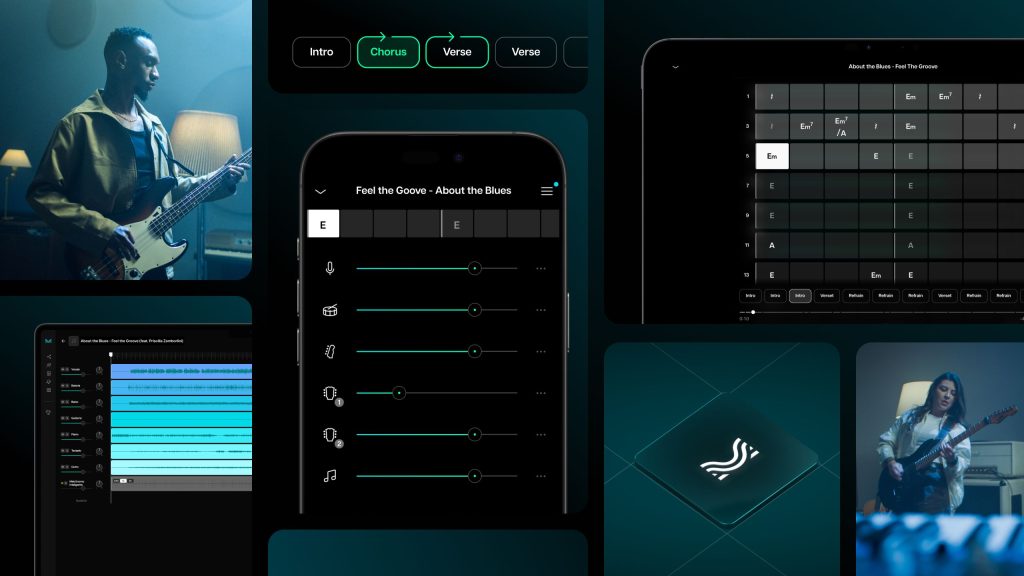
Moises AI is an advanced music intelligence tool that lets you separate stems, remove vocals, adjust pitch and tempo, and even generate backing tracks instantly.
It’s designed to make professional music editing accessible to everyone — from beginners to pros.
Whether you’re remixing, learning a song, or creating a mashup, Moises gives you complete control over your audio.
🎯 Perfect For
🎸 Musicians & Singers
🎧 Music Producers
🥁 Band Members
🎼 Music Students
🎤 Vocal Coaches
🎥 Content Creators
🎙️ Podcasters & Editors

Anyone who needs fast, high-quality music processing with AI.
🔑 Key Features of Moises AI
🎵 AI Stem Separation – Split vocals, drums, bass, piano, and more
🎚 Smart Mixing Tools – Balance levels and remix directly in the app
🎧 Pitch & Tempo Control – Adjust key or speed without distortion
⏱ Automatic Beat Detection – Perfect for syncing and looping
🎶 Metronome & Chord Detection – Great for practice and songwriting
🔄 Audio Mastering with AI – Instantly improve sound quality
📱 Cross-Platform App – Works on web, iOS, and Android
☁️ Cloud Storage – Keep your projects synced across devices
Moises combines powerful AI with musician-friendly usability.
🌟 Why We Loved Moises AI
Moises feels like having a sound engineer and producer in your pocket.
The AI stem separation is incredibly clean, and the ability to slow down or transpose songs makes it invaluable for both practice and production.
Highlights
✅ Easy-to-use interface
✅ Excellent stem clarity
✅ Real-time tempo & pitch control
✅ Ideal for rehearsals and remixing
✅ Smart metronome and chord tracking
✅ Great for karaoke or backing tracks
Whether you’re practicing guitar or remixing vocals, Moises delivers professional results.
⚠️ Areas for Improvement
💰 Some advanced features require a premium subscription
🎧 Limited export formats in free version
🌐 Internet connection needed for processing
Even so, Moises offers one of the most complete music AI experiences available.
🚀 How to Use Moises AI
1️⃣ Upload your song (MP3, WAV, etc.)
2️⃣ Choose what you want to isolate (vocals, drums, instruments…)
3️⃣ Let AI process and separate your stems
4️⃣ Remix, change pitch, or master your track directly
5️⃣ Export and share your new mix 🎶
✅ Pro Tip:
Use Moises for live rehearsals — isolate your part, loop it, and practice perfectly in time.
🏁 Final Verdict
Moises AI is one of the best all-in-one AI music platforms today.
From stem separation to mastering and practice tools, it’s built to help creators, musicians, and producers at every level.
If you’re serious about music —
Moises will change how you create, learn, and remix forever.
✅ Our Favorite Feature
⭐ Real-Time Stem Separation & Tempo Control
The ability to isolate instruments and adjust tempo instantly makes Moises a game-changer for modern musicians.