TripIt AI Review – Smarter Travel Planning with Artificial Intelligence

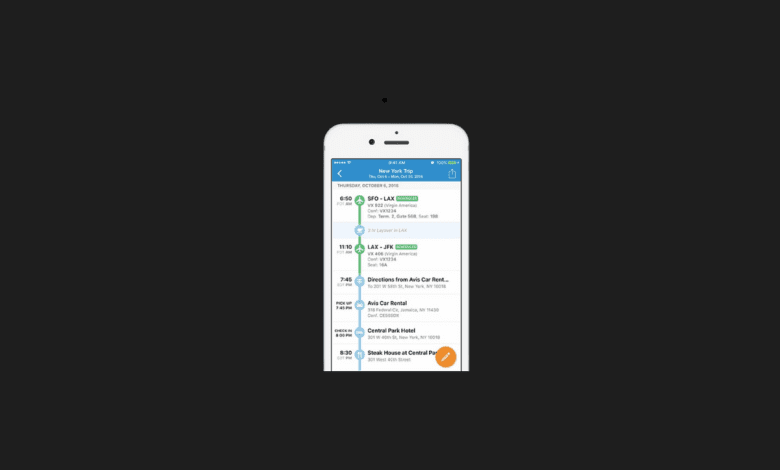

Traveling isn’t just about booking flights and hotels — it’s about keeping everything organized, stress-free, and optimized. TripIt AI takes the hassle out of trip planning by using artificial intelligence to automatically create itineraries, provide real-time updates, and give you a smarter travel experience.
What we loved most about TripIt AI is its ability to turn a messy inbox of travel confirmations into a clean, smart itinerary. From flights and hotels to car rentals and dinner reservations, everything is synced automatically and enhanced with AI-powered recommendations.
In this review, we’ll explore what TripIt AI is, its features, benefits, limitations, pricing, and how to use it effectively.
What is TripIt AI?

TripIt AI is an AI-powered travel assistant designed to organize all your travel details into one simple, easy-to-access itinerary. It uses machine learning and predictive analytics to provide real-time flight alerts, alternative routes, and personalized travel suggestions.
It’s perfect for:
✈️ Frequent Flyers who need real-time flight updates
🧳 Business Travelers managing complex schedules
🌍 Vacationers wanting stress-free trip planning
👨👩👧 Families & Groups traveling together and sharing itineraries


Key Features of TripIt AI
- Automatic Itinerary Creation – Forward your confirmation emails, and TripIt builds your trip plan instantly
- Real-Time Flight Alerts – AI-powered updates on delays, cancellations, and gate changes
- Alternative Route Suggestions – Finds backup flights when things go wrong
- Interactive Maps – Helps navigate airports, hotels, and destinations
- Personalized Recommendations – AI suggests restaurants, attractions, and activities
- Calendar Sync – Integrates with Google Calendar, Outlook, and Apple Calendar
- Travel Stats – Tracks miles flown, trips taken, and carbon footprint
Why We Enjoyed TripIt AI
The most impressive aspect of TripIt AI is its automation and intelligence. Instead of juggling multiple apps or digging through emails, everything is neatly organized in one place.
Highlights include:
⚡ Efficiency – Saves hours by automatically building itineraries
🛫 Stress-Free Travel – Proactive alerts for delays and cancellations
💡 Smart Insights – Personalized tips based on your past trips
🌱 Sustainability – Tracks your travel footprint and suggests greener options
Areas for Improvement
Although TripIt AI is powerful, it has a few downsides:
📶 Internet Reliance – Needs connectivity for real-time updates
💰 Premium Features Locked – Best AI tools are in the Pro version
🌍 Limited Offline Mode – Some features don’t work without data access
🔒 Privacy Concerns – Requires access to travel confirmation emails
How to Use TripIt AI
Getting started is simple:
- Sign Up – Create a free or Pro account
- Forward Confirmation Emails – Send bookings to plans@tripit.com
- View Itinerary – AI organizes flights, hotels, cars, and activities
- Enable Real-Time Alerts – Get instant notifications about changes
- Sync Calendars – Keep your schedule aligned across devices
- Explore with AI – Use recommendations for restaurants, tours, and attractions
💡 Pro Tip: Upgrade to TripIt Pro if you travel often — the flight alerts and alternative route suggestions are a game-changer.
Final Verdict
TripIt AI is the ultimate AI-powered travel assistant, perfect for anyone who wants organized, stress-free journeys. By combining automation with smart insights, it saves time, reduces stress, and keeps travelers prepared for anything.
Our favorite feature? The real-time flight alerts — they notify you of delays or cancellations faster than most airlines! 🚀✈️
You Might Also Like;