

Do you have grainy footage from the early 2000s, blurred family VHS tapes, or low-resolution clips that look terrible on modern screens? In the past, enlarging a video meant losing quality and creating a pixelated mess. Today, AI video enhancers have changed the game.
Using deep learning algorithms, these tools don’t just stretch the image—they hallucinate new details, fix motion blur, and restore lost textures. Whether you are a YouTuber looking to remaster old content or a filmmaker restoring archives, here are the 5 best AI tools to upscale old videos to 4K.
1. Topaz Video AI (The Industry Standard)
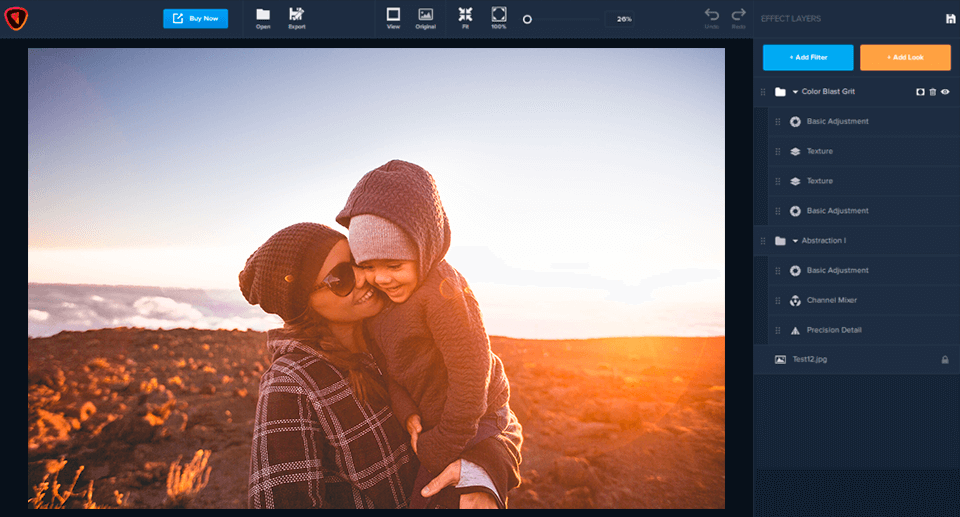
When people talk about AI upscaling, Topaz Video AI is usually the first name that comes up. It is widely used by professionals because it offers granular control over the AI models. Instead of a simple “enhance” button, it allows you to choose specific models for deinterlacing, motion interpolation (making 24fps video look like 60fps), and shake stabilization.
Key Features:
- Recover Video Details: Upscale SD to HD, or HD to 4K/8K without artifacts.
- Motion Deblur: Specifically targets fast-moving objects to reduce ghosting.
- Frame Interpolation: Generates new frames for buttery smooth slow motion.
Best For: Professionals and enthusiasts with powerful computers (requires a good GPU).
2. AVCLabs Video Enhancer AI (Best for Restoration)
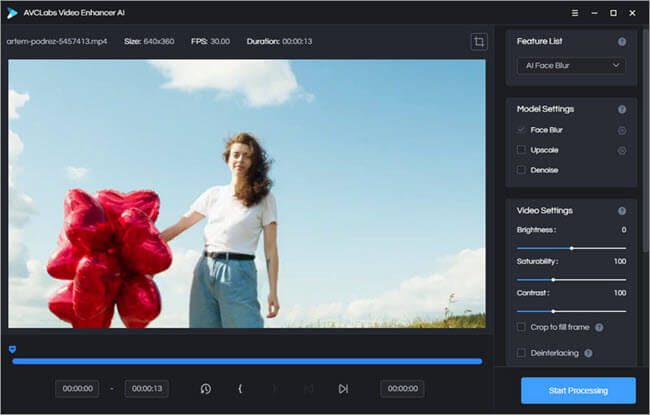
AVCLabs is a powerhouse when it comes to breathing life into truly old footage. It excels at colorization, making it the perfect choice if you are trying to restore black-and-white films or family history videos. Its automated processing pipeline makes it easier to use than Topaz for beginners.
Key Features:
- AI Colorizer: Automatically turns B&W footage into vibrant color videos.
- Face Refinement: Detects faces in low-resolution clips and reconstructs facial details for clarity.
- Multi-Frame Enhancement: Uses information from surrounding frames to reduce noise and grain effectively.
Best For: Users focusing on restoring and colorizing old family movies or historical footage.


3. HitPaw Video Enhancer (Most User-Friendly)

If you find technical settings intimidating, HitPaw Video Enhancer is the solution. It uses a “One-Click” approach with specialized AI models designed for specific scenarios. It is incredibly intuitive: just select the type of video you have, and the AI does the rest.
Key Features:
- General Denoise Model: Great for standard low-light videos.
- Animation Model: Specifically trained to upscale anime and cartoons without losing line definition.
- Face Model: Dedicated purely to fixing blurry portraits in videos.
Best For: Beginners and anime fans who want a simple, “set it and forget it” solution.
4. TensorPix (Best Cloud-Based Solution)

Not everyone has a $2,000 gaming PC to render 4K video. TensorPix runs entirely in the cloud via your web browser. This means you can upscale videos using a Chromebook or an older laptop, as their servers do the heavy lifting.
Key Features:
- No Hardware Required: All processing happens online.
- Comparison Preview: See a side-by-side slider before you commit credits to render the full video.
- Multiple Filters: Includes de-flickering and dirt removal for old film scans.
Best For: Users with low-end computers or those who need to edit on the go.
5. Winxvideo AI (The All-in-One Toolkit)

Winxvideo AI (formerly WinX HD Video Converter) has integrated powerful AI tools into its suite. It is a hybrid tool that offers AI upscaling alongside traditional video conversion and compression tools. It is lightweight and optimized to run smoothly on average hardware.
Key Features:
- Stabilization: Excellent at fixing shaky footage from handheld cameras or drones.
- CineAI Technology: Balances quality enhancement with fast rendering speeds.
- Compress & Convert: Upscale your video and then compress it to a shareable size without losing that 4K clarity.
Best For: Content creators who need a versatile tool for converting, editing, and upscaling simultaneously.
Conclusion: Which Tool Should You Choose?
Choosing the right AI video enhancer depends on your hardware and your goals.
- For maximum quality and control, go with Topaz Video AI.
- For anime and simplicity, choose HitPaw.
- If you don’t have a powerful GPU, TensorPix is your best friend.
Restoring old memories or upgrading your content library to 4K has never been easier. Download a trial version of these tools today and see the difference for yourself.
You Might Also Like;









