Tableau AI Review – The Smart Analytics Tool That Turns Raw Data into Actionable Stories in Seconds



In the era of data-driven storytelling, Tableau AI is redefining how we see, understand, and act on data.
Instead of spending hours cleaning, analyzing, and visualizing, this intelligent analytics platform transforms raw numbers into clear, actionable insights — automatically and beautifully.
💡 What is Tableau AI?
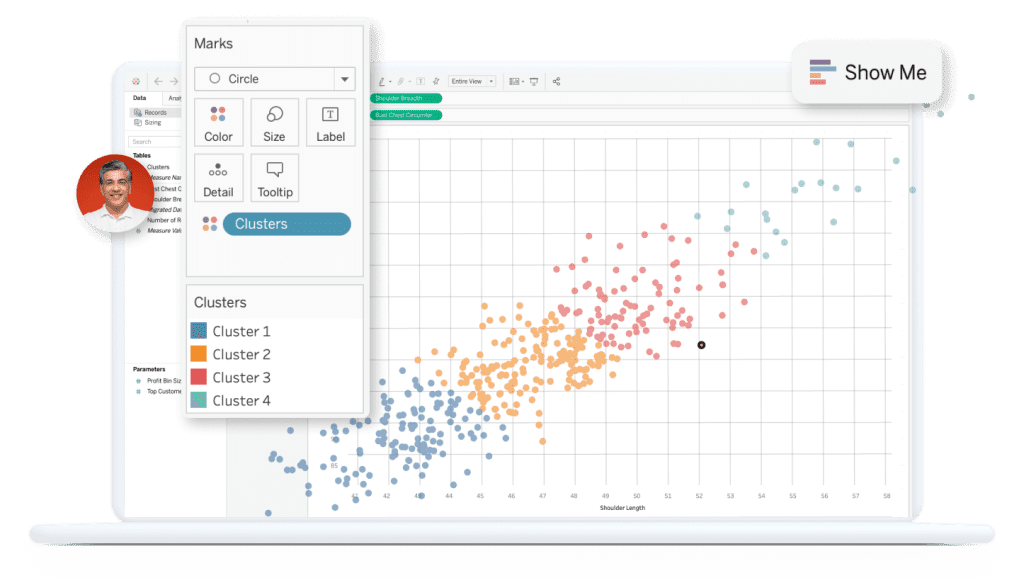
Tableau AI is an AI-powered analytics platform developed by Tableau (a Salesforce company) that blends advanced analytics, predictive modeling, and natural language processing into one smart system.
It’s built to make data analysis effortless and human-friendly.
From business analysts to decision-makers, anyone can ask questions in plain English and instantly get visual, data-backed answers.
Tableau AI leverages Einstein Copilot, Tableau Pulse, and Explain Data to provide automated insights, narrative summaries, and intelligent visualizations — all powered by trusted AI.
🔑 Key Features of Tableau AI
🧠 AI-Driven Insights – Automatically detects trends, anomalies, and key metrics hidden in your data.
💬 Einstein Copilot (Conversational AI) – Ask questions naturally (“Why did sales drop last quarter?”) and get instant visual answers.
📈 Predictive Analytics – Forecasts future trends and identifies what drives performance.
📊 Data Storytelling – Converts charts and dashboards into written narratives that explain what happened and why.
🎯 Tableau Pulse – Personalized daily insights delivered directly to users — like having your own data assistant.
🎨 Smart Visualization Suggestions – AI recommends the best chart type and layout for your dataset.
🛡️ Einstein Trust Layer – Ensures every AI-generated insight is transparent, auditable, and secure.
🌐 Cross-Platform Integration – Works seamlessly across Tableau Cloud, Desktop, and Server environments.
🌟 Why We Loved Tableau AI
Tableau AI’s real magic lies in its ability to turn complex data into clear stories — instantly.


Instead of spending hours building dashboards or explaining reports, you get:
- ⚡ Speed – Turn complex datasets into actionable insights within minutes.
- 🎯 Ease of Use – Perfect for non-technical users and analysts alike.
- 💬 Natural Language Queries – Talk to your data just like chatting with ChatGPT.
- 📊 Context-Aware Visuals – AI picks the right visuals for your question.
- 🔍 Explainability – Understand the “why” behind every data point.
- 🧩 Deep Salesforce Integration – Unified experience with Einstein AI across CRM and analytics.
It’s data storytelling — elevated through AI.
⚠️ Areas for Improvement
No tool is perfect, and Tableau AI is no exception.
Here are a few areas that could improve:
💵 Pricing – Advanced AI features are available mainly in premium plans.
⚙️ Limited Manual Control – Analysts wanting deep customization might find some automation restrictive.
📊 Data Quality Dependency – AI results are only as good as the data you feed it.
🚀 Performance with Large Datasets – Very large or complex models can take longer to process.
🔍 Transparency – Some users may want deeper insight into how AI makes recommendations.
🚀 How to Use Tableau AI
1️⃣ Upload Your Data – Connect to spreadsheets, databases, or cloud data sources.
2️⃣ Activate AI Features – Turn on “Explain Data,” “Ask Data,” or “Pulse.”
3️⃣ Ask a Question – Type in a query (e.g., “Show sales trends by region”).
4️⃣ Review AI Insights – Explore automatic visuals and narrative explanations.
5️⃣ Customize & Share – Adjust visuals, build dashboards, and share insights securely.
💡 Pro Tip: The cleaner and more structured your data, the better Tableau AI performs. Use expressive metrics and contextual data for deeper insights.
🏁 Final Verdict
Tableau AI is the future of intelligent analytics — a powerful, intuitive system that helps anyone understand data like a pro.
Just as Magisto AI turns raw footage into cinematic stories, Tableau AI transforms raw data into clear, emotional, and data-driven stories that inspire smarter decisions.
Whether you’re a marketer tracking campaign performance, a manager optimizing operations, or a creator visualizing impact — Tableau AI makes data storytelling fast, beautiful, and human.
✅ Our Favorite Feature: Einstein Copilot — a conversational AI that understands context and delivers instant visual insights that feel like they were crafted by a human analyst. ✨📈
You Might Also Like;