I remember staring at my screen during the WWDC 2026 keynote, waiting for the classic “Hey Siri” moment. We’ve all been there—asking our phones a simple question and getting a frustrating “I found this on the web” in return. But what Apple dropped with iOS 27 and macOS 27 wasn’t just another incremental update; it was a complete rebirth.
I’ve been diving deep into the new Apple Intelligence-backed Siri AI, and honestly, the gap between the old voice assistant we used to joke about and this new powerhouse is absolutely staggering. If you are deeply invested in the Apple ecosystem, the way you interact with your devices is about to change forever. Let’s break down exactly what makes this new generation so special and why I think it’s the biggest leap Apple has made in years.
What Can the New Siri AI Actually Do?

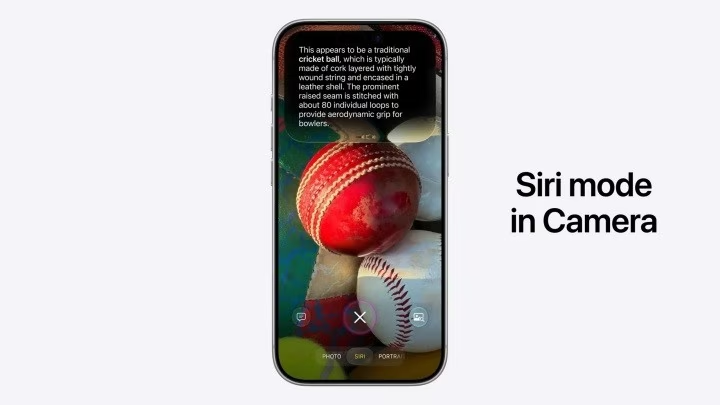
Before we get into the nitty-gritty comparisons, let’s take a quick look at the expanded toolkit. Siri is no longer just a glorified egg timer. Here is a snapshot of its core capabilities:
- Deep Personal Context Understanding: It actually knows you.
- On-Screen Awareness: It sees what you see.
- Flawless App Integration: Moving data between apps seamlessly.
- Natural Conversational Flow: No more rigid commands.
- Visual Intelligence Support: Using your camera to understand the world.
- Advanced Shortcuts Automation: Doing the heavy lifting for you.
- Cross-Device Continuity: Starting a task on your iPhone and finishing it on your Mac.
While the old Siri was great for setting alarms or playing a specific Spotify playlist, it fell apart the moment you asked a follow-up question. Siri AI is built from the ground up on Apple’s new AI models, designed to actually reason through your requests.
The End of the “Goldfish Memory”

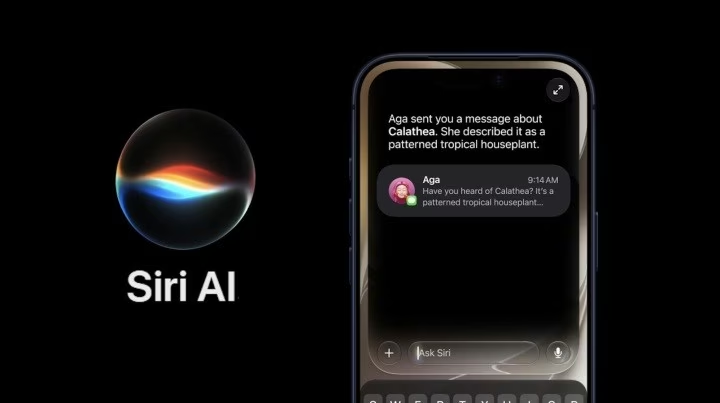
For me, the absolute biggest game-changer is personal context awareness.
Think about how the old Siri handled things. Every request existed in a vacuum. If you asked, “Where does Sarah live?” and then followed up with, “How long does it take to get there?”, old Siri would completely lose the plot.
Siri AI changes the rules. If you give it permission, it securely taps into your messages, emails, photos, and notes. I was genuinely amazed when I realized that if I asked for a friend’s address, Siri AI wouldn’t just awkwardly open my Contacts app and wait. It can actually scan a recent iMessage where my friend texted me their new address, extract that information, and instantly give me directions. It feels incredibly intuitive.
Siri Finally Has Eyes: On-Screen Awareness

This is where things get futuristic. Old Siri was completely blind to whatever was happening on your iPhone, iPad, or Mac screen.
With On-Screen Awareness, Siri AI analyzes the content you are currently viewing and takes action based on it. Imagine a friend texts you a link to a new cafe in Messages. Instead of manually copying the address, opening Maps, and saving it, you can just say, “Add this address to her contact card,” or “Give me directions to this place.” Siri knows exactly what “this” refers to. It saves so much unnecessary tapping.
Cross-App Magic and Natural Conversations
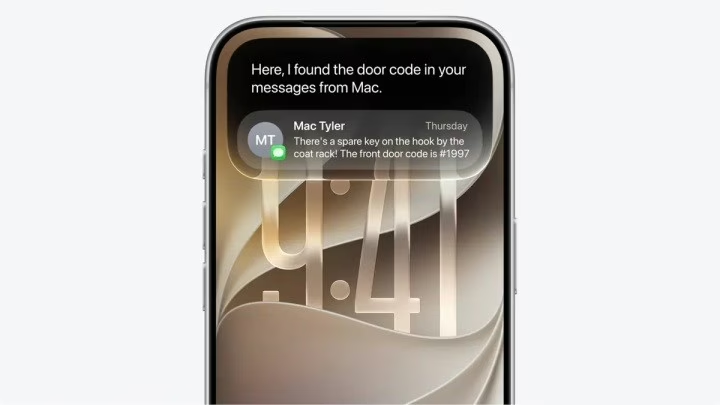
We don’t live in just one app, so why should our voice assistant? Siri AI understands your intent and can execute multi-step actions across different applications.
- Complex Itineraries: It can pull flight details from your Mail and automatically block out your Calendar.
- Natural Dialogue: You don’t have to speak like a robot anymore. If you stumble over your words or change your mind mid-sentence (“Set an alarm for 7 AM… no, wait, make it 7:30 AM”), Siri AI keeps up. It maintains the context of the conversation, making it feel like a modern, intelligent assistant rather than a rigid command line.
A Glowing New Look and Visual Intelligence


Apple didn’t just upgrade the brain; they completely overhauled the personality and interface. Gone is the old, intrusive Siri bubble at the bottom of the screen. Now, when you trigger Siri, a beautiful glowing light wraps around the edges of your display. It feels deeply integrated into the system.
Furthermore, it now works hand-in-hand with Visual Intelligence. You can point your camera at a restaurant, a product, or a monument, and Siri will pull up contextual information instantly. It’s like having a real-time tour guide in your pocket.
Can We Trust It? (The Privacy Question)
Whenever I look at AI that reads my emails and sees my screen, my first thought is always: What about my privacy?
Apple is leaning hard into its privacy-first reputation here. Most of Siri AI’s processing happens on-device. For heavier tasks that require more computational muscle, Apple uses something called Private Cloud Compute. They guarantee that your personal data is never stored or made accessible to anyone else—not even Apple. It’s a bold claim, but given their track record, it’s a much more comforting approach compared to some competitors.
The Ultimate Showdown: Siri AI vs Old Siri
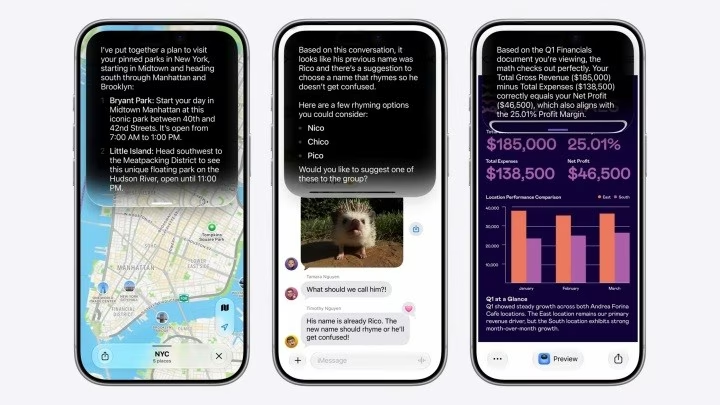
To make things super clear, here is a quick breakdown of how the two generations stack up:
| Feature | Siri AI | Old Siri |
| Conversations | Natural, flowing dialogues | Basic, rigid voice commands |
| Personal Context | Deeply understands personal data & preferences | Extremely limited |
| Screen Awareness | Understands exactly what is on your screen | Completely blind to your screen |
| App Actions | Deep, cross-app execution | Mostly just opening apps |
| Voice Options | Highly expressive and customizable | Limited customization |
| Writing Aid | Helps write, summarize, and refine text | Non-existent |
| Visual Intelligence | Understands objects/info via your camera | Non-existent |
| Memory | Maintains context across multiple queries | Forgets context immediately |
| Privacy | On-device + Private Cloud Compute | On-device for simple tasks |
Will Your Device Make the Cut? 📲
Here is the hard truth: Not every Apple device is getting Siri AI.
Because these features require serious processing power, Apple is limiting the full Apple Intelligence suite to newer hardware. While older devices (like an iPhone 11) will still receive the iOS 27 update, they will be left out of the advanced Siri AI features. Currently, in its beta phase, it’s also restricted to US English. But if you have the right hardware ready for the iOS 27, iPadOS 27, or macOS 27 updates, you are in for a treat.
Looking at all these changes, I can’t help but feel that we are finally getting the digital assistant we were promised a decade ago. It actually feels like a companion rather than a tool.
What about you? Are you excited to let Siri AI manage your daily tasks, or does the idea of an AI reading your screen still feel a bit too sci-fi for your taste? Let’s chat in the comments!
You Might Also Like;
- The New Era of Space Mechanics: Extending Satellite Lifespans
- AI Discovers Groundbreaking Non-Opioid Painkiller
- Mind Over Matter: What Neuralink’s First Human Trial Really Means for Our Future
-

-

-

-

-

-

-

-
-
-
-
-