
Artificial intelligence is transforming graphic design, and Crello (VistaCreate) AI is a versatile tool for AI-driven visual content creation, templates, and design automation. Unlike traditional design software, Crello AI helps users generate stunning graphics, social media posts, and marketing visuals quickly using intelligent AI suggestions.
What we loved most while testing Crello AI is how fast, intuitive, and accessible it is. Whether you’re a marketer, content creator, or entrepreneur, Crello AI allows you to produce professional-quality designs without advanced design skills.
In this review, we’ll explore what Crello (VistaCreate) AI is, its key features, benefits, limitations, pricing, and how to use it effectively.
What is Crello (VistaCreate) AI?
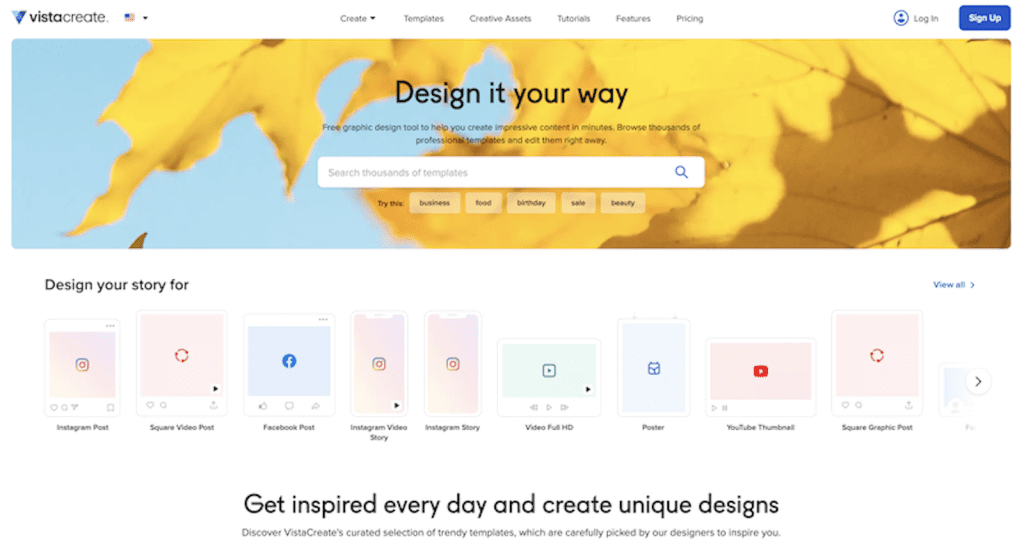
Crello AI is an AI-powered graphic design platform that assists users in creating visuals, social media content, presentations, and marketing materials. It combines AI templates, content suggestions, and editing tools to simplify design for both beginners and professionals.
It’s ideal for:
- Social media managers and marketers
- Small business owners and entrepreneurs
- Content creators and educators
- Anyone looking to create visually appealing designs efficiently
Key Features of Crello (VistaCreate) AI

- AI Design Assistance: Generate layouts, colors, and typography suggestions automatically.
- Template Library: Access thousands of pre-designed templates for various use cases.
- AI Text & Graphics Tools: Create text content, banners, and visual elements easily.
- Photo Editing & Effects: Remove backgrounds, apply filters, and enhance images with AI.
- Collaboration Features: Share and edit designs with team members seamlessly.
- Multi-Platform Access: Use on web, desktop, or mobile for consistent workflow.
Why We Enjoyed Crello (VistaCreate) AI
The most impressive feature of Crello AI is how it simplifies creative processes while maintaining high-quality results.


Other advantages include:
- Time-Saving: AI generates design suggestions and automates repetitive tasks.
- User-Friendly: Intuitive interface suitable for both beginners and pros.
- Professional Quality: Templates and AI recommendations ensure polished visuals.
- Versatile Applications: Perfect for social media, marketing, presentations, and personal projects.
Areas for Improvement
- Pricing: Some advanced AI features require a paid subscription.
- Customization Limits: AI suggestions may need manual tweaking to match branding perfectly.
- Internet Required: Cloud-based tool needs stable connectivity.
- Over-Reliance Risk: Users may depend too much on AI suggestions rather than creative input.
How to Use Crello (VistaCreate) AI
Using Crello AI is simple:
- Sign Up: Create an account on VistaCreate.com.
- Select a Template or Start from Scratch: Choose a pre-designed template or blank canvas.
- Use AI Tools: Apply AI design suggestions, create text content, and enhance visuals.
- Customize & Edit: Adjust colors, fonts, and layouts to fit your brand.
- Collaborate & Share: Invite team members to edit or approve designs.
- Download & Publish: Export designs for social media, presentations, or marketing campaigns.
💡 Pro tip: Combine AI-generated designs with your unique branding elements to ensure originality and consistency.
Final Verdict
Crello (VistaCreate) AI is a powerful and intuitive design platform that leverages AI to make professional-quality design accessible to everyone. Its AI-powered templates, editing tools, and smart suggestions save time and boost creativity for marketers, teams, and content creators.
Our favorite part? The AI-assisted design suggestions that make creating polished visuals quick and enjoyable, even for beginners.
You Might Also Like;