Scenario AI Review – The Future of Game Art Creation with Artificial Intelligence



Game art is entering a new era — and Scenario AI is one of the tools leading that revolution. Designed for developers, artists, and studios, Scenario uses AI-driven tools to generate consistent, high-quality game assets in your unique art style. It’s like having your own concept artist, texture designer, and art director — all powered by artificial intelligence.
What impressed us most while testing Scenario was its ability to maintain visual style consistency. You can train the AI on your own artwork, allowing it to generate characters, items, environments, and textures that match your project’s unique look. It saves countless hours of manual work while keeping your creative direction intact.
In this review, we’ll explore what Scenario is, its key features, benefits, limitations, pricing, and how you can integrate it seamlessly into your game development workflow.
💡 What is Scenario AI?
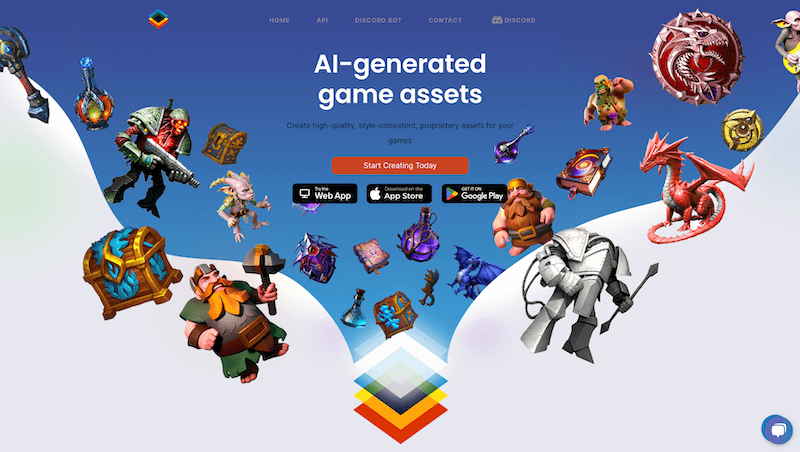
Scenario AI is an AI-powered art generation platform built specifically for game development. It enables users to create custom assets by training their own AI models using proprietary art. This ensures the results are not just generic images — they’re visually consistent and perfectly aligned with your game’s aesthetic.
It’s perfect for:
🎨 Artists who want to accelerate asset creation without losing artistic control
🎮 Game Developers looking to prototype visuals quickly
🏢 Studios aiming to reduce art production time and costs
🧠 Design Teams that need scalable, style-consistent visuals
🔑 Key Features of Scenario AI
🧩 Custom AI Model Training – Upload your artwork to train personalized models that understand your game’s unique visual style
🎨 Asset Generation – Instantly create characters, items, backgrounds, and concept art
⚙️ Style Consistency – Maintain visual identity across all assets
🚀 Fast Production – Generate assets in minutes instead of weeks
🧠 Copyright-Safe Outputs – AI learns from your own data, ensuring ownership of generated content
🕹️ Integration Ready – Compatible with game engines and design pipelines

🌟 Why We Loved Scenario AI
Scenario stands out for giving creators full control over their art direction. Unlike general AI image tools, it’s built specifically for game development, meaning the results are more relevant, consistent, and ready to use.
Other highlights include:
⚡ Speed – Rapid generation of high-quality visuals
🎮 Control – You decide how your AI learns and produces assets
💡 Creativity Boost – Perfect for brainstorming and concept art sessions
🏗️ Scalability – Ideal for large studios needing bulk asset creation
⚠️ Areas for Improvement
While Scenario AI is impressive, there’s still room to grow:
💵 Pricing – Advanced features and custom model training can be expensive
🎨 Learning Curve – Fine-tuning models may require experimentation
🌐 Cloud Reliance – Requires an internet connection for most tasks
🧰 Limited Animation Support – Primarily focuses on static assets for now
🚀 How to Use Scenario AI
1️⃣ Sign Up – Create your account at scenario.com
2️⃣ Upload Artwork – Provide your existing assets for model training
3️⃣ Train a Custom Model – Let the AI learn your game’s unique style
4️⃣ Generate Assets – Create new visuals instantly
5️⃣ Refine & Export – Adjust and integrate results directly into your workflow
💡 Pro Tip: Use Scenario early in your pipeline to generate concept art and visual references before finalizing your design direction.
🏁 Final Verdict
Scenario AI is transforming how game art is created. By merging machine learning with artistic creativity, it empowers teams to build visually cohesive and imaginative worlds faster than ever. Whether you’re a solo developer or a full studio, Scenario ensures your visuals stay beautiful, unique, and production-ready.
You Might Also Like;