
Let’s face it — coding efficiently and accurately is challenging. Writing functions, understanding existing code, or generating boilerplate can take significant time. That’s where CODET5 comes in.
After testing it ourselves, what we loved most is how CODET5 uses AI to understand, generate, and assist with code, providing context-aware suggestions and automating repetitive tasks. Unlike basic code editors, CODET5 leverages state-of-the-art AI models to improve coding efficiency, support multiple languages, and even assist with documentation.
In this review, we’ll explore what CODET5 is, its key features, advantages, limitations, pricing, and how developers can integrate it into their workflow.
What is CODET5?
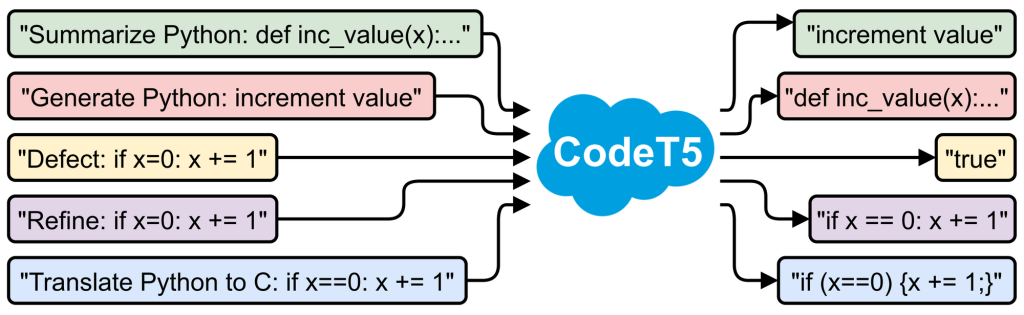
CODET5 is an AI-powered code understanding and generation tool developed for developers, researchers, and teams. It uses transformer-based models trained on large code datasets to provide highly accurate code completions, suggestions, and code summarization.
It supports multiple programming languages and integrates with various IDEs and platforms, making it suitable for both learning and professional development environments.
Key Features of CODET5
- Code Generation: Automatically generates code snippets and functions based on context.
- Code Summarization: Converts complex code into readable summaries and explanations.
- Bug Detection & Suggestions: Helps identify errors and suggests fixes.
- Multi-Language Support: Compatible with Python, Java, JavaScript, C++, and more.
- IDE Integration: Can be used with popular IDEs or as a standalone tool.
- Learning Assistance: Ideal for students or developers learning new languages or frameworks.
Why We Enjoyed CODET5
The standout feature is its ability to understand code context and provide meaningful suggestions, which reduces errors and boosts productivity. It’s like having an AI co-developer who helps you write cleaner, faster, and smarter code.


Other advantages include:
- Efficiency: Saves time on repetitive or boilerplate code.
- Learning Aid: Great for understanding new codebases and best practices.
- Versatile: Useful for multiple programming languages and frameworks.
- Error Reduction: Helps detect and fix common coding mistakes.
Areas for Improvement
- Subscription or Access Requirements: Some advanced features may need paid access or specific integrations.
- Occasional Inaccurate Suggestions: While highly accurate, AI may sometimes provide suboptimal solutions.
- Learning Curve: New users may need time to fully utilize all features.
How to Access and Use CODET5
Getting started with CODET5 is straightforward:
- Visit CODET5 Platform or Repository: Access via official sources or GitHub.
- Set Up Environment: Follow installation or API integration instructions for your preferred IDE.
- Input Code or Task: Enter code snippets, functions, or requests for generation.
- Receive AI Suggestions: CODET5 will provide code completions, summaries, or improvements.
- Review and Implement: Accept or modify suggestions to fit your project.
💡 Pro tip: Use CODET5 not just for generation but also to analyze and understand legacy code, which is especially helpful for learning new codebases.
Final Verdict
CODET5 AI Tools are an advanced assistant for developers, students, and teams looking to improve coding efficiency, reduce errors, and learn better coding practices.
Our favorite part? Its ability to generate, summarize, and assist with code intelligently — transforming every coding session into a faster, smarter, and educational experience.
You Might Also Like;