VidIQ AI Review – The Smart YouTube Growth Assistant Every Creator Needs


With millions of videos uploaded every day, standing out on YouTube is harder than ever. Creators need more than talent — they need data-driven insights, SEO optimization, and trend awareness to grow consistently.
That’s where VidIQ AI shines.
VidIQ isn’t just an analytics tool.
It’s an AI-powered growth engine that helps creators understand what to create, when to publish, how to optimize, and how to outperform their competitors.
From keyword research and title suggestions to real-time trend insights and personalized coaching, VidIQ feels like having a professional YouTube strategist on your team 24/7 — guiding you toward higher views, better engagement, and faster growth.
This is more than a dashboard.
It’s a smart co-pilot for creators.
💡 What Is VidIQ AI?
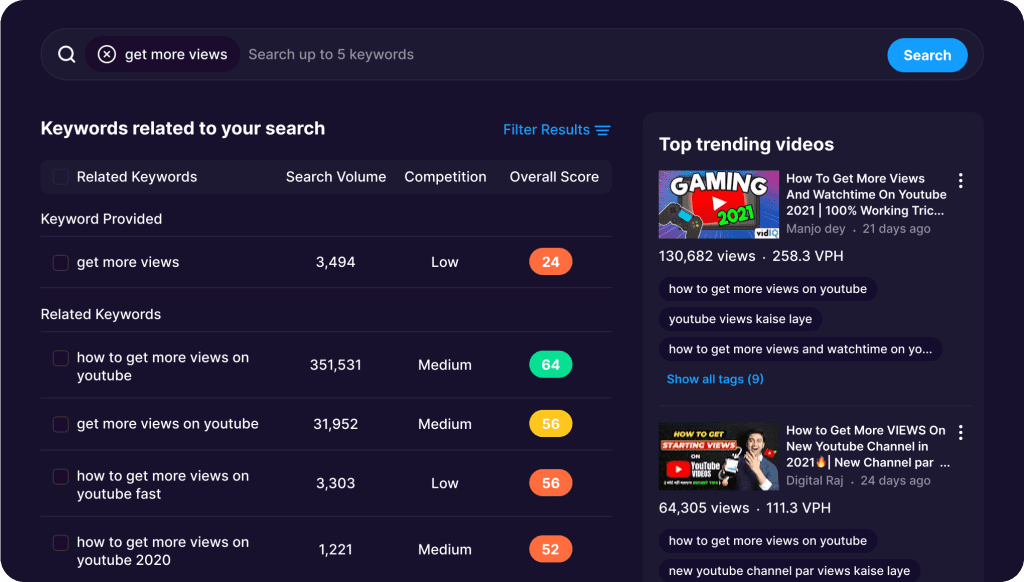
VidIQ AI is a YouTube growth platform that uses artificial intelligence to help video creators increase views, improve SEO, discover top trends, and optimize content for better performance.


Whether you’re a new YouTuber or a full-time creator, VidIQ provides data-backed recommendations to grow your channel strategically.
Perfect for:
🎥 YouTubers
📈 Content Marketers
💼 Brands
📰 Media Companies
🎬 Production Teams
Ideal for anyone who wants to boost visibility, audience engagement, and search ranking.
🔑 Key Features of VidIQ AI
🔍 AI Keyword Research
Find high-potential keywords with low competition to rank faster.
✍️ AI Title & Description Generator
Get optimized titles, video descriptions, and YouTube tags instantly.
📊 Competitor Analysis
Track other creators’ performance, video topics, and strategies.
📈 Trend Alerts & Topics
Discover trending content ideas before the market gets saturated.
🎯 Video SEO Score
Measure how well your video is optimized for YouTube search.
📅 Best Posting Time
AI analyzes your audience to recommend peak posting times.
🧠 Daily Ideas Feed
Personalized video ideas recommended by AI based on your niche.
🔥 Real-Time Performance Tracking
Monitor growth, impressions, CTR, and engagement.
🏷️ Tags & Metadata Optimization
Boost search visibility for faster ranking.
🌟 Why We Loved VidIQ AI
What makes VidIQ AI special is its ability to turn YouTube’s massive complexity into simple, actionable steps.
VidIQ helps you:
✅ Identify trending opportunities
✅ Rank higher on search
✅ Create content your audience wants
✅ Beat your competitors
✅ Save time on research
The smart workflow makes content planning easier, faster, and far more effective.
It’s like having:
📊 A strategist
✍️ A copywriter
🔍 An SEO expert
🤖 …and a performance coach
—all working together to level up your channel.
⚠️ Areas for Improvement
VidIQ AI is powerful, but there are a few limitations:
💰 Best features are in paid plans
📈 Can feel overwhelming for new creators
🌍 Some keyword data may vary by region
Even so, for serious YouTubers, the investment pays off.
🚀 How to Use VidIQ AI
1️⃣ Install the Chrome extension or visit vidiq.com
2️⃣ Connect your YouTube channel
3️⃣ Explore analytics & keyword recommendations
4️⃣ Use AI to generate titles, tags & descriptions
5️⃣ Track competitors & trends
6️⃣ Publish optimized videos
7️⃣ Monitor performance & refine strategy
✅ Pro Tip:
Use the Daily Ideas feed to create content around high-potential topics with less competition — perfect for fast growth.
🏁 Final Verdict
VidIQ AI is one of the most powerful tools available for YouTube creators.
With smart keyword research, AI-assisted optimization, and deep competitor insights, it gives creators everything they need to grow faster and smarter.
Whether you’re trying to hit your first 1,000 subscribers or scale past 1 million, VidIQ delivers insights that transform strategy into success.
✅ Our Favorite Feature
Daily AI video ideas — personalized suggestions that help you choose topics that actually drive views.
If you’re serious about growing your channel,
VidIQ AI is a must-have.
You Might Also Like;