
Navigating legal issues, bureaucratic processes, or consumer rights can be overwhelming — but DoNotPay AI is here to simplify it. Dubbed the “robot lawyer,” DoNotPay leverages artificial intelligence to help users handle legal tasks, dispute claims, cancel subscriptions, and more — all without hiring an attorney.
What we loved most while testing DoNotPay AI is its ability to automate tedious legal tasks while remaining remarkably user-friendly. Unlike traditional legal services, it provides instant guidance, document generation, and actionable advice, making legal help more accessible and affordable.
In this review, we’ll cover what DoNotPay AI is, its key features, benefits, limitations, pricing, and how to use it effectively.
⚖️ What is DoNotPay AI?
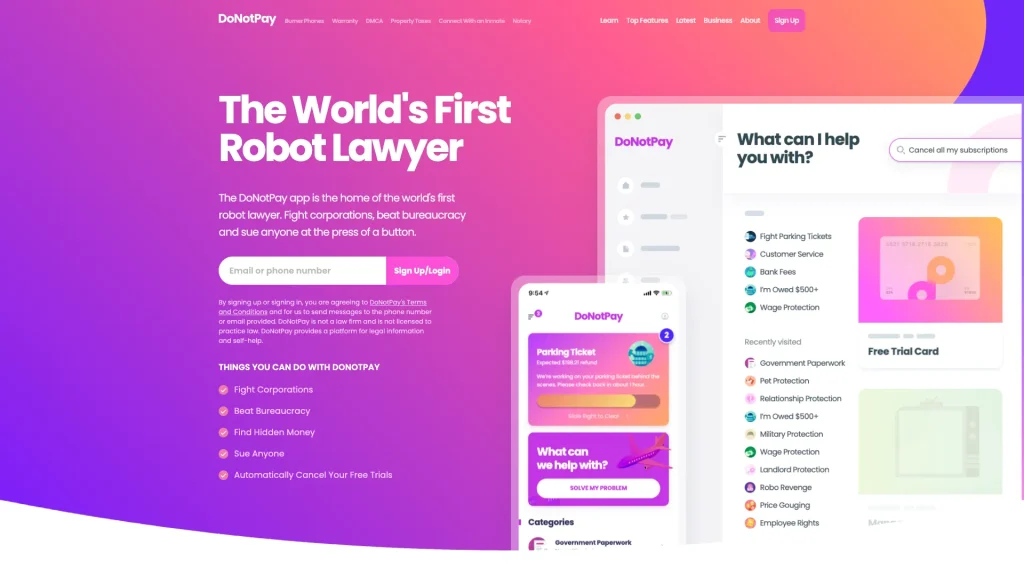
DoNotPay AI is an AI-powered legal and consumer assistant designed to help users tackle everyday legal and administrative tasks. From contesting parking tickets to managing subscriptions or appealing airline fees, DoNotPay automates processes that traditionally require lawyers or lengthy bureaucracy.
It’s perfect for:
🧑💼 Consumers seeking help with disputes, refunds, or claims
🚗 Drivers contesting tickets and fines
🏢 Small Businesses handling legal paperwork efficiently
📱 Anyone wanting to save time and money on routine legal tasks
🔑 Key Features of DoNotPay AI
Automated Legal Documents – Draft letters, appeals, and legal notices instantly.


Dispute Resolution – Contest parking tickets, bank fees, or unfair charges automatically.
Subscription & Bill Management – Cancel unwanted subscriptions and recurring charges.
Consumer Rights Assistance – Guidance for refunds, compensation claims, or service disputes.
AI Chatbot Guidance – Step-by-step instructions for legal or administrative processes.
Travel & Refund Claims – File claims for flight delays, lost luggage, or cancellations.
Security & Privacy – Keeps your data safe while handling sensitive tasks.
🌟 Why We Loved DoNotPay AI
The standout feature of DoNotPay AI is its automation of legal and bureaucratic tasks, which saves time, reduces stress, and often recovers money for users.
Other highlights include:
⚡ Speed – Processes tasks and generates documents in minutes
💡 Cost-Effective – Much cheaper than hiring a lawyer for small claims
📈 Accessibility – No legal background required; highly user-friendly
📱 Versatility – Covers a wide range of legal, consumer, and administrative issues
⚠️ Areas for Improvement
While DoNotPay AI is a groundbreaking tool, there are areas for growth:
💵 Pricing Tiers – Some advanced features require a subscription
🌍 Jurisdiction Limits – Mainly tailored for U.S. law; other regions limited
🛠 Complex Cases – Not suitable for major legal proceedings or litigation
📊 AI Limitations – Guidance is automated and may require human review
🚀 How to Use DoNotPay AI
Getting started with DoNotPay AI is simple:
- Visit DoNotPay.com
- Sign Up to create your account
- Select a Task – Choose from ticket disputes, subscriptions, claims, etc.
- Follow the AI Instructions – Enter relevant details and let DoNotPay generate documents or submit claims.
- Track Progress – Monitor your disputes, refunds, or appeals in real time
- Receive Results – Get confirmation, refunds, or outcomes automatically
💡 Pro Tip: Combine DoNotPay AI with reminders and notifications to never miss a subscription cancellation or legal deadline.
🏁 Final Verdict
DoNotPay AI is revolutionizing how individuals handle legal and bureaucratic challenges. By automating complex processes and providing actionable guidance, it saves time, money, and stress.
Our favorite feature? The AI-powered dispute and document automation, which turns frustrating legal tasks into simple, actionable steps — making you feel like you have a personal lawyer in your pocket. 🚀
You Might Also Like;