I’ve always believed that a great product can easily be ignored if its visual presentation falls flat. I distinctly remember trying to set up a makeshift photo studio in my living room a few years back using desk lamps and white bedsheets to shoot some tech accessories. Let me tell you, it was a frustrating disaster. High-quality product photography has always been a major bottleneck for independent creators and small businesses.
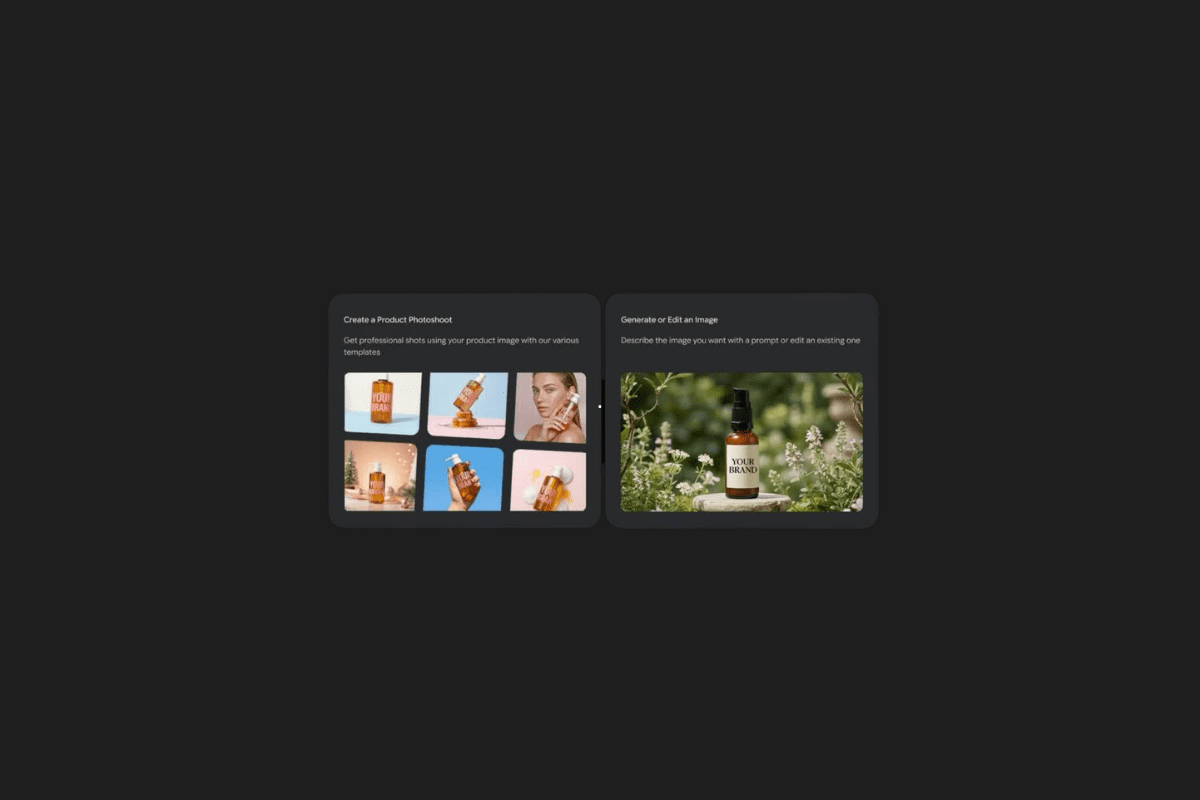
So, when I started exploring what Google Labs just rolled out with their Pomelli platform, I was genuinely surprised. They’ve introduced a new feature called Photoshoot, and it essentially puts a high-end commercial photography studio right inside your browser—completely free of charge. I want to break down exactly what this means, why it’s not just “another AI filter,” and how you can actually use it.
Say Goodbye to Expensive Studio Rentals


Running a small or medium-sized enterprise (SME) usually means you are the CEO, the marketing department, and the janitor all at once. Keeping up with the relentless pace of digital marketing is a full-time job on its own.
Pomelli was originally built to help businesses create campaigns that actually look like they belong to their brand. But this new Photoshoot update takes things to a completely different level. Instead of paying thousands of dollars for a professional agency to shoot your new coffee mug or leather wallet, you can now take a basic photo on your phone and let Pomelli’s AI transform it into a stunning studio or lifestyle shot.
The Magic Behind the Scenes: Nano Banana & Business DNA

What really caught my attention here isn’t just the output, but the engine running under the hood. Pomelli utilizes Google’s Nano Banana image generation technology. If you haven’t heard of it, it’s an incredibly powerful AI model that understands composition, lighting, and texture far better than older generations of image generators.
But a pretty picture isn’t enough; it needs to look like your brand. That’s where Pomelli’s Business DNA comes in. The system analyzes your existing brand context, color palettes, and stylistic guidelines to ensure the final image doesn’t just look good, but actually looks like it belongs on your website.
Here is how the streamlined process actually works:
- Start with anything: You don’t need a perfect source image. Snap a picture of your product against a relatively plain background.
- Pick your vibe (or let the AI decide): You can manually select templates—like a sleek “studio shot” or a warm “lifestyle setting”—or you can simply ask Pomelli to suggest the best environment based on your product.
- Automatic Brand Alignment: The AI applies your Business DNA, ensuring the lighting and props match your brand’s unique identity.
- Fine-tuning: You aren’t stuck with the first result. You can easily tweak the prompt, adjust fine details, and dial in the perfect look.
- Save and Deploy: Download the final masterpiece directly or save it back into your Business DNA library for future ad campaigns.
Beyond Basic Background Replacements

I’ve tested plenty of “background removal” tools, but Pomelli is offering a much deeper level of creative control. With their latest updates to the visual generation models, you can now blend text and image prompts seamlessly.
Want to place your product in a misty forest at dawn? Just type it. Need to apply the distinct visual style of one campaign image to an entirely new product? The new style transfer capabilities handle that beautifully. It bridges the gap between having a rough idea in your head and getting a polished, ready-to-publish asset.
Smart Campaigns from a Simple URL
Perhaps the most practical feature for busy founders is the URL integration. If you are exhausted by the idea of building an ad campaign from scratch, you can now simply paste your product’s URL into Pomelli.
The system will scrape your existing images, product titles, and descriptions, and automatically generate highly specific, targeted marketing campaigns. It’s like having a junior marketing assistant who instantly understands your product catalog and drafts creative assets in seconds.
My Takeaway
I see a lot of AI tools that are fun to play with but ultimately useless for real-world business applications. Pomelli’s Photoshoot feels different. It solves a very real, very expensive problem for small businesses: visual trust. High-quality imagery builds consumer confidence, and by democratizing access to professional-grade visuals, Google is leveling the playing field for indie sellers everywhere.
I’m curious to see how creative people will get with this. If you had access to a free, high-end AI photo studio right now, what is the very first product you would test it out on? Let’s talk about it in the comments below!
You Might Also Like;
- A Midnight Stroll with a Humanoid Robot: Why the Macau Incident Changes Everything
- Unitree PUMP MAX Review: The Ultimate Portable Smart Gym
- The End of an Era: Breaking Down the Epic Dune: Part Three Trailer
-
-

-

-
-
-

-
-

-
-

-

-