In today’s fast-paced creative industry, design isn’t just about aesthetics — it’s about speed, collaboration, and innovation. Figma AI is an AI-powered design assistant that helps designers, teams, and businesses create smarter, faster, and more efficiently.
What impressed us most while testing Figma AI is its real-time design suggestions and automation features. Unlike traditional design tools, Figma AI doesn’t just give you a canvas — it actively helps improve layouts, generate design ideas, and even adapt to your team’s workflow.
In this review, we’ll cover what Figma AI is, its key features, benefits, limitations, pricing, and how to use it effectively.
What is Figma AI?


Figma AI is an intelligent design assistant built into the Figma ecosystem. By leveraging machine learning and AI-driven automation, it enhances the way designers work by offering layout improvements, design recommendations, and even AI-generated content placeholders.
It goes beyond basic design tools by helping you:
- Generate layout ideas instantly
- Improve UI/UX with smart suggestions
- Maintain consistent branding across projects
- Speed up prototyping and wireframing
It’s perfect for:
- 🎨 UI/UX Designers working on websites and mobile apps
- 👩💻 Product Teams collaborating on prototypes
- 📊 Businesses & Startups needing fast design iterations
- 🖌 Creative Agencies handling multiple client projects
Key Features of Figma AI
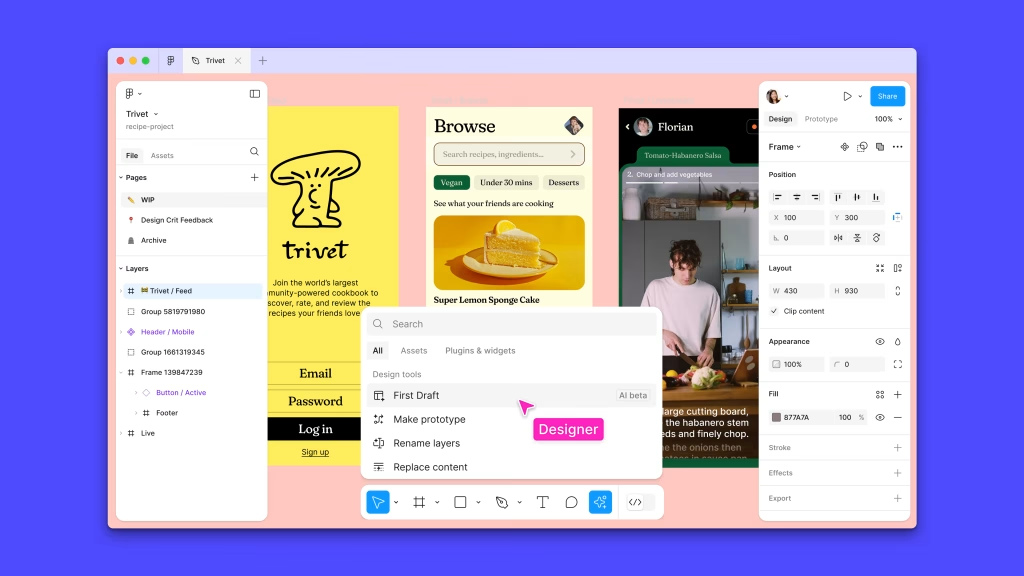
- Smart Layout Suggestions – Automatically adjusts spacing, alignment, and proportions.
- Design Generation – Quickly create wireframes and mockups based on prompts.
- Content Placeholders – AI-generated text and images for faster prototyping.
- Color & Style Recommendations – Suggests palettes and font pairings that fit your brand.
- Collaboration Tools – Real-time AI-powered feedback for teams.
- Consistency Checker – Ensures your designs stay on-brand across projects.
- Plugin Integration – Expands AI features with third-party tools.
Why We Enjoyed Figma AI
The most impressive part of Figma AI is its ability to save time while maintaining design quality. Instead of spending hours on repetitive adjustments, AI handles small tasks so you can focus on creativity.
Other highlights include:
- 🚀 Productivity Boost – Rapid prototyping and layout optimization.
- 🎯 User-Friendly – Works seamlessly inside Figma’s existing platform.
- 💡 Creative Inspiration – Generates new design ideas when you’re stuck.
- 🤝 Collaboration Made Easy – Teams get smarter feedback and consistency.
Areas for Improvement
While Figma AI is powerful, there are areas where it could improve:
- 💵 Pricing – Advanced AI features may require premium plans.
- 🎨 Complex Projects – Sometimes struggles with highly custom designs.
- 🌐 Internet Dependence – Requires strong connectivity to function smoothly.
- 🔧 Learning Curve – New users may need time to fully utilize AI features.
How to Use Figma AI
Getting started with Figma AI is simple:
- Sign Up – Create a Figma account or log in.
- Enable AI Features – Access AI tools within the design dashboard.
- Start Designing – Use prompts to generate layouts or prototypes.
- Leverage Smart Suggestions – Let AI handle spacing, colors, and typography.
- Collaborate – Work with teammates in real time with AI-powered consistency checks.
- Iterate Faster – Use generated variations for A/B testing and client presentations.
💡 Pro tip: Use Figma AI’s style recommendations when building a new brand kit — it ensures your fonts, colors, and visuals stay cohesive across all designs.
Final Verdict
Figma AI is more than just a design tool — it’s a creative partner that blends speed, intelligence, and collaboration. By automating repetitive tasks and sparking new ideas, it empowers designers to focus on what matters most: creativity and user experience.
Our favorite feature? The smart layout and style recommendations, which instantly improve design quality while saving hours of manual adjustments. 🎨✨
You Might Also Like;
- The Mystery of the Far Side: What Is Hiding in the Lunar Shadows? | Metaverse Planet
- The Doomsday Clock Hits 85 Seconds to Midnight: Are We Out of Time?
- Nvidia’s AI Can Now Predict the Future (Of Weather)
-

-

-
-
-
-

-

-
-

-
-
-