

We’ve all been there. You capture a perfect, once-in-a-lifetime moment—only to find it’s slightly blurry, pixelated, or just too small to use. In the past, that photo was a lost cause. But today, thanks to artificial intelligence, “fixing it” is no longer a fantasy.
AI image upscalers and enhancers are powerful tools that do more than just make a photo bigger. They intelligently analyze, reconstruct, and enhance your image, adding realistic detail, removing blur, and reducing noise.
But with so many options out there, which one is right for you? We’ve tested and reviewed the top 8 AI tools designed to bring your blurry photos back to life.
2The 8 Best AI Tools to Unblur and Sharpen Your Images
Here is our breakdown of the best platforms, from professional-grade software to quick and easy online tools.
1. Topaz Labs (Gigapixel AI & Sharpen AI)

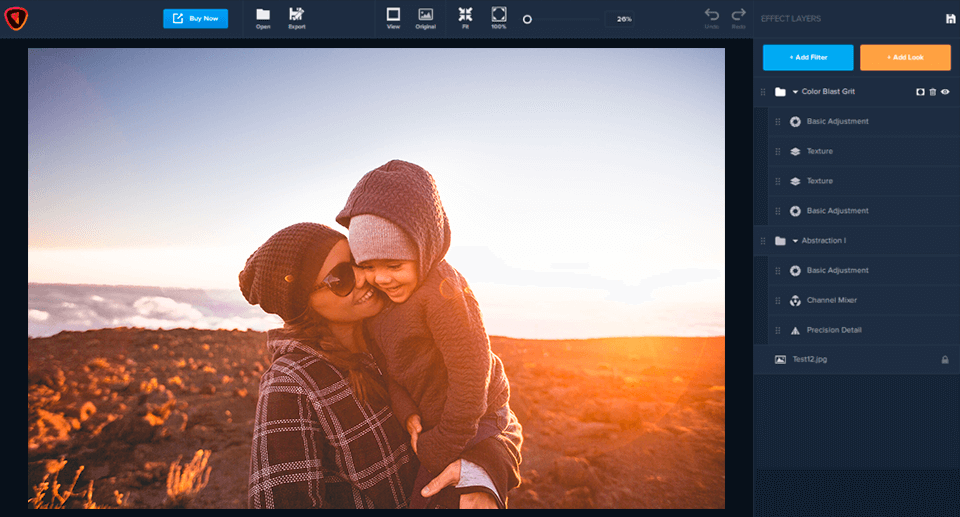
Best For: Professionals and photographers who demand the absolute best quality.
Topaz Labs is often considered the industry heavyweight. While they offer separate tools like Gigapixel AI (for upscaling) and Sharpen AI (for de-blurring), their results are unmatched. These desktop apps use deep learning to analyze your image and apply stunning, realistic detail. It’s not just making pixels bigger; it’s creating new, believable information.
- Pros:
- Industry-leading sharpness and detail.
- Excellent at recovering faces and textures.
- Gives you granular control over the enhancement process.
- Cons:
- Requires a powerful computer.
- Paid, one-time purchase (can be expensive).
- Has a steeper learning curve than web-based tools.
2. Luminar Neo


Best For: The creative photographer who wants an all-in-one editor.
Luminar Neo isn’t just an upscaler; it’s a full-featured photo editor powered by AI. Its enhancement tools are built into a complete workflow. Features like “Supersharp AI” and “Structure AI” allow you to rescue blurry shots and enhance details intelligently, without creating harsh “over-sharpened” halos.
- Pros:
- A complete photo editing suite, not just a single tool.
- AI tools are intuitive and integrated.
- Great for enhancing portraits, landscapes, and more.
- Cons:
- Might be overkill if you only need to unblur a photo.
- Subscription or one-time purchase model.
3. HitPaw Photo Enhancer


Best For: Simplicity and powerful “one-click” results.
HitPaw has gained massive popularity for one reason: it’s incredibly easy to use and delivers fantastic results. This desktop software offers several AI models (e.g., General, Denoise, Face) that you can apply with a single click. It’s especially powerful at cleaning up old, grainy photos or making blurry faces crystal clear.
- Pros:
- Extremely user-friendly interface.
- Specialized AI models for different types of photos.
- Can batch-process multiple images.
- Cons:
- Requires a software download.
- The free trial is very limited; requires a subscription for real use.
4. Fotor (AI Photo Enhancer)

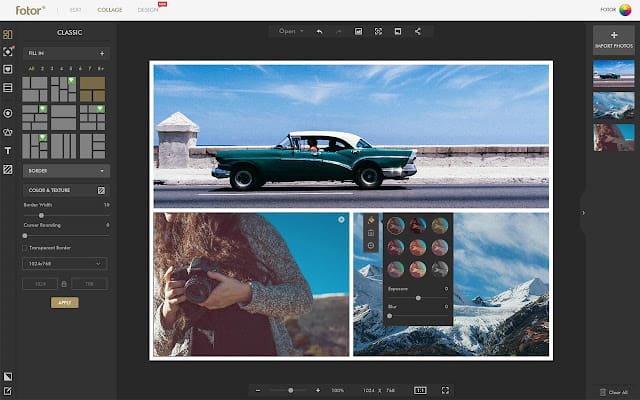
Best For: Social media users and quick online enhancements.
Fotor is a well-known online design and editing tool, and its “AI Photo Enhancer” is impressively simple. You can upload a photo and, with one click, Fotor will automatically unblur, sharpen, and improve the color and lighting. It’s the perfect tool for quickly preparing an image for an Instagram post or a blog.
- Pros:
- Web-based; no download needed.
- “1-Tap Enhance” is fast and effective.
- Part of a larger suite of editing and design tools.
- Cons:
- Less control than dedicated desktop apps.
- Highest quality and resolutions are locked behind a Pro subscription.
5. VanceAI Image Upscaler

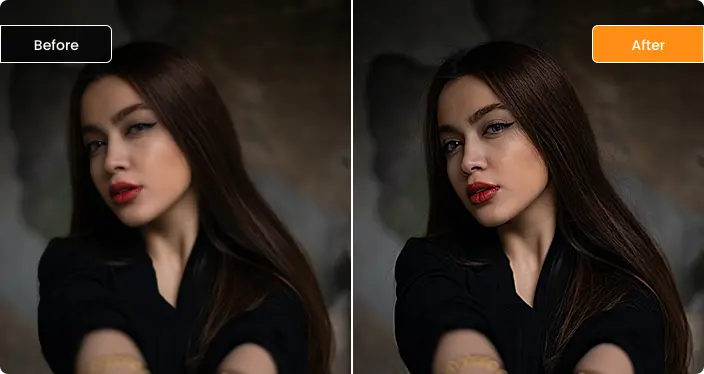
Best For: Fast, web-based upscaling with specific AI models.
VanceAI is another powerful online tool that uses dedicated AI models to fix your photos. It has a specific “AI Image Sharpener” that excels at tackling motion blur and out-of-focus issues. Its upscaler can enlarge images by up to 8x while adding detail, making it great for turning a small, old photo into a printable one.
- Pros:
- Very fast processing.
- Good, specific models for sharpening, denoising, and upscaling.
- Also offers an anime-specific model for illustrations.
- Cons:
- The free version is limited to a few credits (photos).
- The user interface can feel a bit cluttered.
6. Canva (AI Image Enhancer)


Best For: Designers, marketers, and anyone already using Canva.
If you already live in Canva, this is a no-brainer. Tucked inside the photo editor is an “Enhance Image” feature powered by AI. While it’s not the most powerful tool on this list, it’s incredibly convenient. You can upload a blurry image, enhance it, and immediately drop it into your presentation, social media graphic, or poster design.
- Pros:
- Extremely convenient for existing Canva users.
- Simple, one-click operation.
- Free to use within the Canva platform.
- Cons:
- Very basic; no controls or options.
- Results are good, but not as dramatic as dedicated tools.
7. Let’s Enhance (letsenhance.io)


Best For: E-commerce and bulk-processing images for the web.
As the name suggests, this tool is all about enhancement. Let’s Enhance is a web-based service trusted by many businesses to prepare product photos. It can upscale, remove JPEG “artifacts” (those ugly blocks you see in compressed images), and balance colors, all at once. It’s a workhorse for cleaning up many images quickly.
- Pros:
- Great for batch processing.
- Specifically good at removing compression artifacts.
- Simple drag-and-drop interface.
- Cons:
- Operates on a credit-based system (you pay per image after the free trial).
- Focuses more on clean upscaling than extreme blur removal.
8. Upscale.media


Best For: A super-fast, no-nonsense mobile or web-based fix.
Sometimes you just have one photo on your phone that you need to fix now. Upscale.media (from the creators of Remove.bg) is the answer. It’s a dead-simple tool: upload your image, and it automatically upscales and enhances it. The results are surprisingly clean, and it’s one of the fastest tools we tested.
- Pros:
- Incredibly simple and fast.
- Available as a mobile app (iOS and Android) and a web tool.
- Great for a quick fix on the go.
- Cons:
- Almost zero user control.
- Best for minor enhancements, not severe blur.
3. How to Choose the Right Tool for You
It’s easy to get overwhelmed. Ask yourself these questions to find your perfect match:
- Am I a professional? Start with Topaz Labs or Luminar Neo for maximum control and quality.
- Do I just need a quick, easy fix? Use a “one-click” desktop tool like HitPaw or a web tool like Fotor or Upscale.media.
- Am I already using a design tool? Check if Canva or Fotor‘s built-in tools are good enough for your needs.
- Am I on a computer or my phone? Topaz, Luminar, and HitPaw are for desktops. The others are great web-based or mobile options.
Conclusion: Don’t Let Good Memories Stay Blurry
A blurry photo is no longer a dead end. Whether you’re a professional photographer restoring a client’s shoot or just someone trying to save a precious family photo, AI enhancement tools have made photo rescue accessible to everyone.
That once-in-a-lifetime shot doesn’t have to be lost to pixelation. Give one of these tools a try, and watch your blurry memories snap back into brilliant focus.
You Might Also Like;
- The Dark Side of Nanotechnology: Could Microscopic Swarms Erase Billions?
- The Illusion of Digital Immortality: Are You Really Uploading Your Mind?
- The View That Changes Everything: Artemis 2’s Deep Space Eclipse
-
-
-
-

-

-

-

-
-

-

-

-

